

DOWNLOAD GARRETT INSTALLER
AND FOLLOW THE INSTRUCTIONs
1

DOWNLOAD
GARRETT INSTALLER
Download the Garrett Installer on your computer. If you already have installed Garrett installer please start at step 2.
2

LAUNCH
GARRETT INSTALLER
Launch Garrett installer on your computer.
3

LOGIN AND PLUG-IN
YOUR DEVICE
Connect your device and follow the instructions.
Downloads
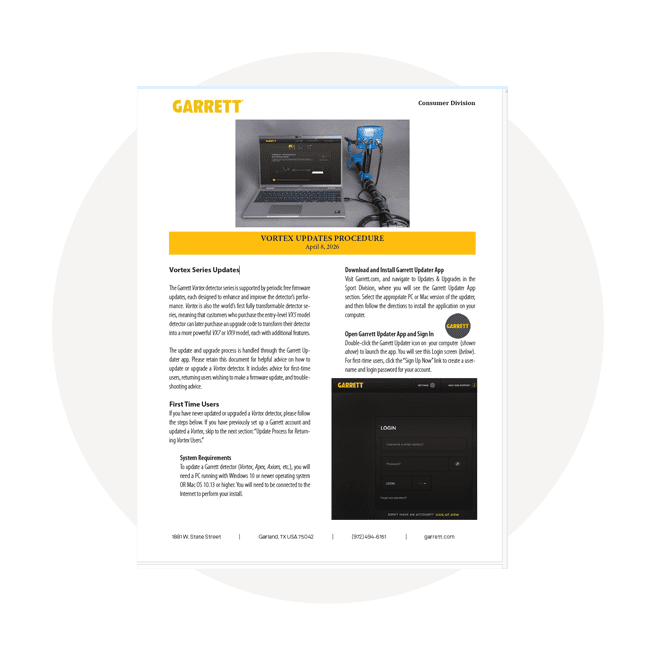
- Install the Garrett Installer
- Open the Garrett Updater App
- Turn your Vortex on and grab the provided USB cable in the box. Connect your device to your computer. (*Make sure that the Vortex is fully charged before updating)
- Follow the on-screen instructions to complete the update. This should only take a few minutes.
- Once the update finishes, disconnect your detector and restart it. Your Vortex now has the latest firmware. Happy Hunting!

Already Installed?
Click on the button to launch Garret Updater
- Open the Garrett Updater
- Turn your Vortex on and grab the provided USB cable in the box. Connect your device to your computer. (*Make sure that the Vortex is fully charged before updating)
- Follow the on-screen instructions to complete the update. This should only take a few minutes.
- Once the update finishes, disconnect your detector and restart it. Your Vortex now has the latest firmware. Happy Hunting!

Already Installed?
Click on the button to launch Garret Installer
Shop by category
4 Results
Vortex VX9 Firmware Update 9.13
Released 02/13/26 – Improvements include:
- Improved Iron Unmasking for Low Conductors
- Increased Multi-Salt Sensitivity
- Direct-Drive Sensitivity Adjustments
- Adjustable Backlight
- Increased Pairing Distance for Wireless Headphones
- Improved Target ID Accuracy for 5” x 8” Ripper Searchcoil
- Improved Stability in Extremely Mineralized Ground
Vortex VX7 Firmware Update 7.06
Released: 2/16/26 – Improvements Include:
- Improved Iron Unmasking for Low Conductors
- Increased Multi-Salt Sensitivity
- Direct-Drive Sensitivity Adjustments
- Adjustable Backlight
- Increased Pairing Distance for Wireless Headphones
- Improved Target ID Accuracy for 5” x 8” Ripper Searchcoil
- Improved Stability in Extremely Mineralized Ground
Vortex VX5 Firmware Update 5.06
Released: 2/16/26 – Improvements Include:
- Improved Iron Unmasking for Low Conductors
- Direct-Drive Sensitivity Adjustments
- Adjustable Backlight
- Increased Pairing Distance for Wireless Headphones
- Improved Target ID Accuracy for 5” x 8” Ripper Searchcoil
- Improved Stability in Extremely Mineralized Ground
Ace Apex Firmware Update 1.28.3
Released 12/16/2025. Includes minor firmware refinements to address manufacturing improvements, no performance changes.